Braille Translator
Type English, get braille dots to copy. Paste dots in and it reads them back.
AI rewrite. Click Translate or press Ctrl/Cmd+Enter. Max 800 characters. Not instant like the word-swap tools.
✨ Works both ways
✨ Numbers and capitals
✨ No signup
About This Braille Translator
Room 3a nearly broke this braille translator. Type it in, and an early version gave back dots that a braille reader would read as "Room 31," because in braille the letter a and the number 1 are the exact same cell. More on that below. Type English to get braille dots, or paste braille in and get English back.
How Do You Read Braille?
By touch, one cell at a time, left to right. It's slower than it sounds at first. Each cell is a little grid of six dot spots, two wide and three tall, numbered 1 to 3 down the left and 4 to 6 down the right. Which dots are raised tells you the letter. A is just dot 1. B is dots 1 and 2. C is 1 and 4. Sighted people can read it by eye too, and that's exactly what the chart below is for.
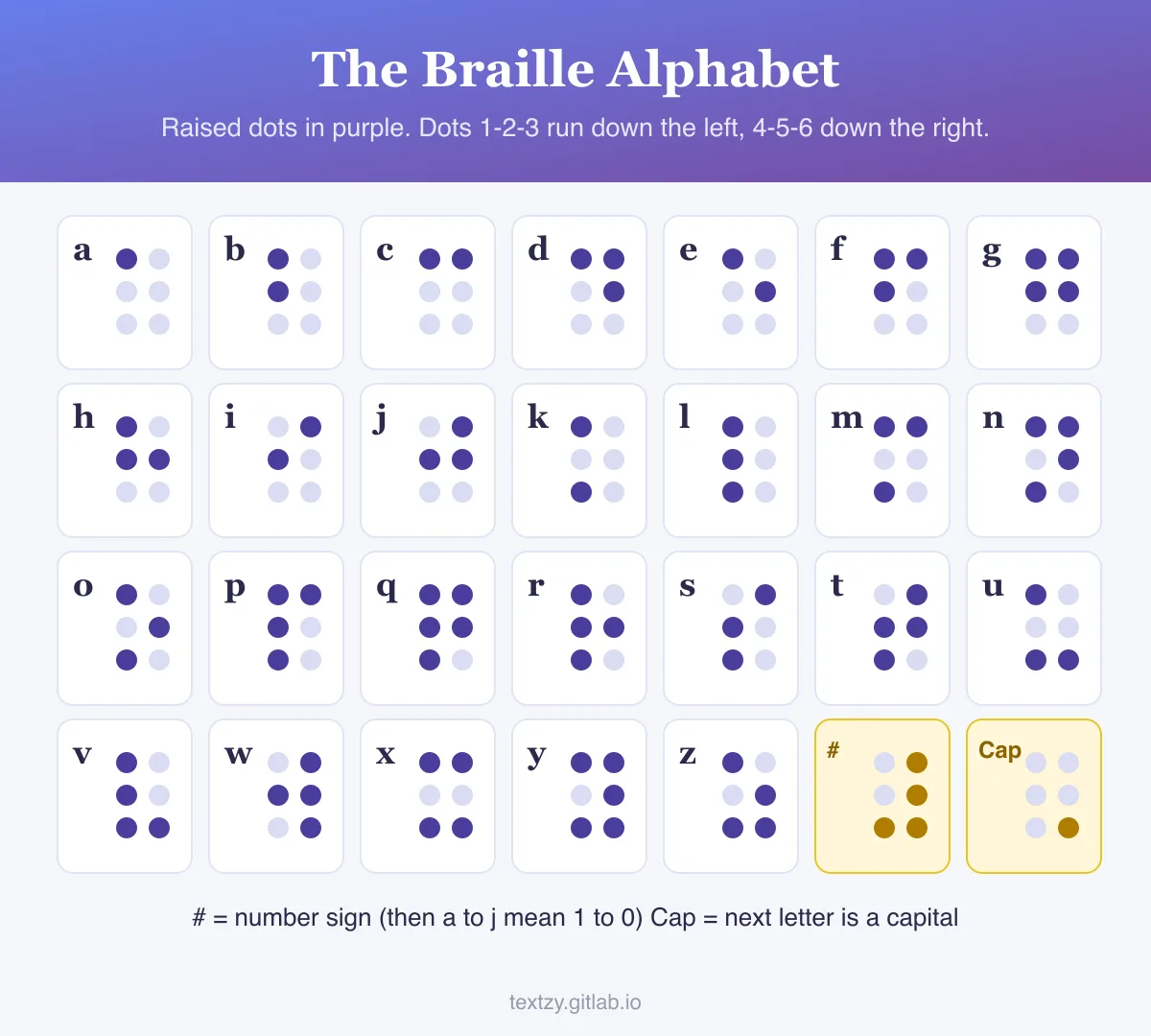
The Braille Alphabet, Copy and Paste
| Letter | Braille | Raised dots |
|---|---|---|
| a | ⠁ | 1 |
| b | ⠃ | 1, 2 |
| c | ⠉ | 1, 4 |
| d | ⠙ | 1, 4, 5 |
| e | ⠑ | 1, 5 |
| f | ⠋ | 1, 2, 4 |
| g | ⠛ | 1, 2, 4, 5 |
| h | ⠓ | 1, 2, 5 |
| i | ⠊ | 2, 4 |
| j | ⠚ | 2, 4, 5 |
| k | ⠅ | 1, 3 |
| s | ⠎ | 2, 3, 4 |
| w | ⠺ | 2, 4, 5, 6 |
| z | ⠵ | 1, 3, 5, 6 |
| capital sign | ⠠ | 6 |
| number sign | ⠼ | 3, 4, 5, 6 |
Spot the trick? K through t are a through j with dot 3 added. U, v, x, y and z add dots 3 and 6. W is the odd one out, because French, which Louis Braille wrote for, barely used it back then, so it got tacked on later.
The Room 3a Problem
Braille has no separate digits. Numbers borrow a to j: put the number sign ⠼ in front, and ⠁ means 1, ⠃ means 2, all the way to ⠚ for 0. That's tidy until there's a letter from a to j right after a number. "3a" turned into ⠼⠉⠁, which reads as 31.
The fix is a small cell called the letter sign, ⠰. It says "numbers are over, this is a letter again." Now Room 3a comes out as ⠠⠗⠕⠕⠍⠀⠼⠉⠰⠁, and pasting that back gives you Room 3a. I tested it on 911, 3.14 and a made-up flat number before calling it done.
Capitals work the same way. A ⠠ in front means the next letter is upper case, so "Hello World" becomes ⠠⠓⠑⠇⠇⠕⠀⠠⠺⠕⠗⠇⠙. The blank-looking gap is a real character too. It's the empty braille cell, so the spacing doesn't fall apart when you copy and paste.
What This Tool Doesn't Do
It writes Grade 1 braille, where every letter's got its own cell. Most braille books use Grade 2, which squeezes common words and letter groups into single cells: "the" is one cell, ⠮, and so are "and" and "for." Grade 2 has close to two hundred of these rules, and a half-right version would be worse than none, so I've kept to Grade 1. Brackets also follow the older American style (one cell, ⠶, both sides), not the newer Unified English Braille that the US switched to in 2016.
And pasted dots on a screen aren't something a blind person can feel, which is worth saying out loud. These are for sighted learners, puzzle makers and anyone curious. For a real braille sign or label, a print shop with an embosser is the way to go.
A Teenager's Fix
Louis Braille lost his sight after an accident in his father's leather workshop at age three. At his school in Paris he met Charles Barbier's "night writing," a 12-dot code meant for soldiers to read in the dark. It was too big to feel with one fingertip. Braille cut it to six dots when he was about 15 and published the system in 1829. His school didn't officially adopt it until 1854, two years after he died. Wikipedia's page on braille has the rest.
Another code built from dots, plus dashes this time: the Morse Code Translator. If ones and zeros are more your thing, there's the Binary Translator. There's a whole shelf of other codes and voices on the translators page.
Questions About the Dots
How do you write numbers in braille? Put the number sign ⠼ first, then use a to j for 1 to 0. So 2026 is ⠼⠃⠚⠃⠋, with the sign only once at the start of the number.
Can I copy and paste braille? Yes. The dots are normal Unicode characters, so they paste into texts, Instagram, Discord or a Word doc, as long as the font has them.
Can it translate braille to English? Yep. Paste dots in and it reads them back, capitals and numbers included. It only reads Grade 1, so a Grade 2 book page will come out garbled.
What is the braille alphabet a to z? Twenty-six cells built from six dots. A is dot 1, b is 1 and 2, c is 1 and 4, and the chart image on this page shows all 26 with their raised dots.
Is braille the same in every language? No. The a to j pattern is shared widely, but each language adds its own letters and contractions, and Chinese and Japanese braille work very differently.