Aurebesh Translator
Type English, copy Star Wars text. Paste it back to read it.
Exact Aurebesh letters (picture)
Aurebesh to English
Click each letter you see, in order. The English builds up below.
✨ Copy and paste text
✨ Works both ways
✨ Save as PNG
Advertisements
Advertisements
About This Aurebesh Translator
Saw odd square letters on a Star Wars screen? Need your name on a helmet by Friday? Type it in this Aurebesh translator and out pops Star Wars alphabet text to copy and paste, plus a picture of the exact letters. Stuck on a line of it already? Paste the symbols back in, or tap the letter keys above and watch the English build up.
What Is Aurebesh?
Star Wars alphabet, and not a language, as any fan will tell you within seconds. Look past the actors in the films and it's on screens and signs, spelling out Galactic Basic, which reaches your ears as English. Learn it and you pick up no new tongue, just the odd pleasure of reading small print on a prop while the rest of the cinema walks right past it.
Stephen Crane built it from a pile of random shapes. He was at West End Games, a tabletop publisher, when those squiggles from Return of the Jedi caught his eye, and he went through them and matched each one to a Latin letter or a pair of letters until he had a working alphabet. Sources credit the first shapes to Joe Johnston. Aurek plus Besh, the first two letters, gave the thing its name, a trick lifted from alpha and beta, which handed us alphabet.
The Aurebesh Alphabet, All 34 Letters
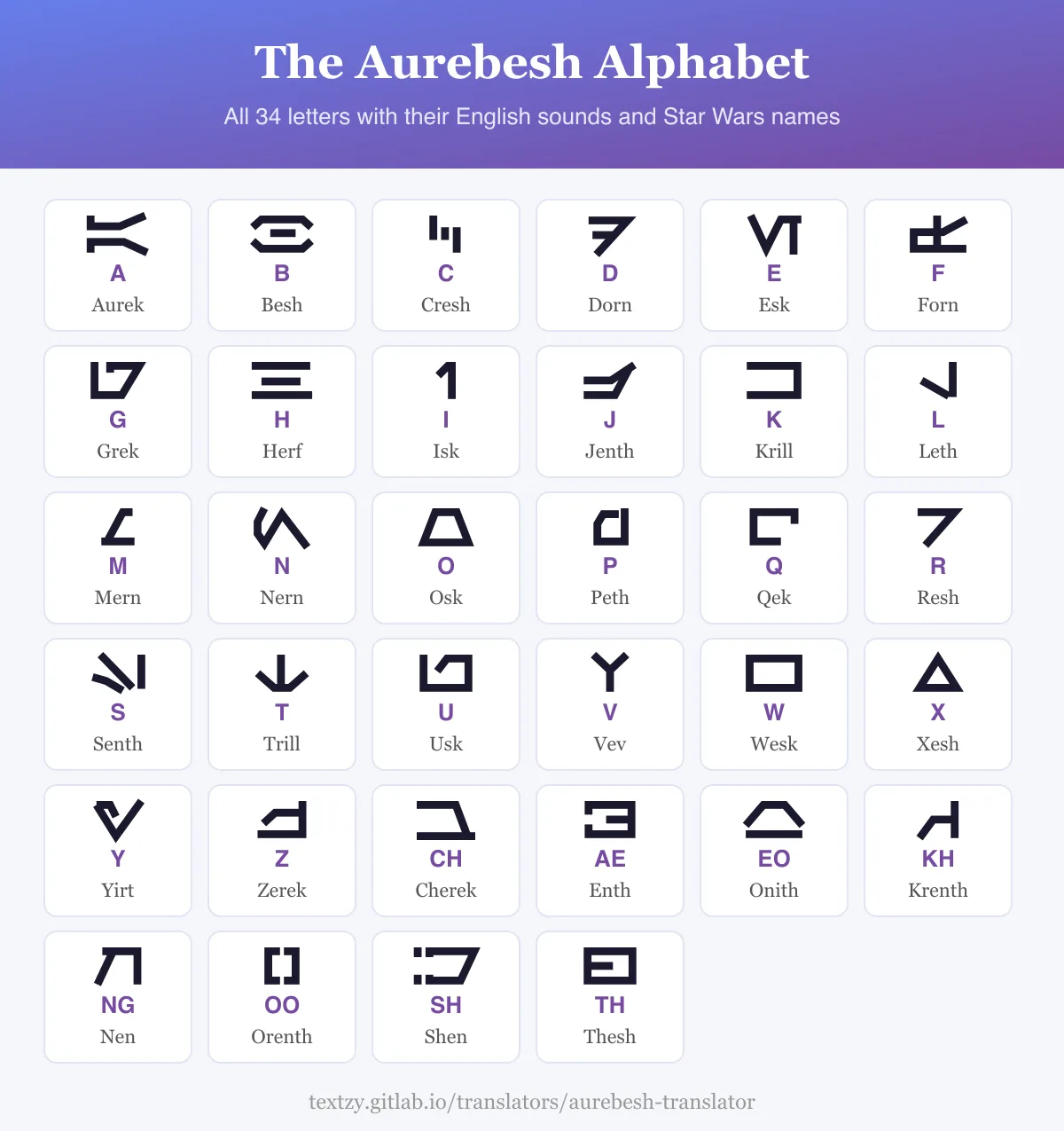
Twenty-six letters map to A through Z. Eight more stand for pairs, and those are why Aurebesh beats a plain swap cipher. They're also optional. Charts and fan writing don't always use them, so there's a box on the tool to turn them off if you'd rather see every single letter spelled out on its own. Leave it ticked and "the" costs you two shapes. Untick it and you'll pay three.
| English | Aurebesh name | Copy and paste |
|---|---|---|
| A | Aurek | ⋉ |
| B | Besh | ⊖ |
| C | Cresh | ⫼ |
| D | Dorn | ᖷ |
| E | Esk | Ⅵ |
| F | Forn | ቲ |
| G | Grek | ᘔ |
| H | Herf | Ξ |
| I | Isk | ⌉ |
| J | Jenth | ⋺ |
| K | Krill | コ |
| L | Leth | ᒍ |
| M | Mern | ∠ |
| N | Nern | ∧ |
| O | Osk | ⏢ |
| P | Peth | ᑯ |
| Q | Qek | ┌ |
| R | Resh | ┐ |
| S | Senth | ⑊ |
| T | Trill | ↓ |
| U | Usk | ⊔ |
| V | Vev | Ƴ |
| W | Wesk | ▭ |
| X | Xesh | △ |
| Y | Yirt | ∀ |
| Z | Zerek | ⊣ |
| CH | Cherek | ⊐ |
| AE | Enth | ヨ |
| EO | Onith | ⩟ |
| KH | Krenth | ᗑ |
| NG | Nen | Π |
| OO | Orenth | ⟦ |
| SH | Shen | ᗊ |
| TH | Thesh | ⊟ |
Can You Copy and Paste Aurebesh?
Yes, with a catch. Unicode never gave Aurebesh any letters, so I lined up about a hundred symbols next to my drawings and kept the closest match for each of the 34, which took longer than the drawing did. Some are lovely. ヨ is nearly perfect for AE, and it's really Japanese. Others are a stretch, and I won't pretend ⑊ is a true S, though it's the nearest thing I could find that didn't just look like a plain slash. But they're real text, so Copy Text carries them into Discord or a bio without any font tricks.
Want the exact shapes instead? That's what the picture under the text box is for. Hit Download PNG or Copy Image and they'll stay put on a card or a cake order. Tattoo or ring? Use the picture, always. Look-alikes change from phone to phone, and an empty box on your arm is a rotten souvenir.
How Do You Read Aurebesh?
Go left to right and drop down a line, same as this page, and don't look for accent marks because there aren't any. Hunt for the short words first, since "the" and "and" are all over the place. Match a shape to its key and click it, then on you go. Honestly, I found the shapes stuck faster once I sounded them out by name. Besh. Osk. Yirt. That spells boy, and now you've read your first word.
My tool can't read a photo, so there's no camera mode here, and I'd rather you click 12 keys and know what you've got than trust a guess from a blurry shot of a spaceship.
From Death Star Monitors to Your Screen
- 1983: Return of the Jedi shows the raw shapes on screen, with no meaning behind them yet.
- 1994: Star Wars Miniatures Battles Companion prints the letter match for the first time.
- 1996: Crane adds Aurebesh punctuation.
- 1999: The Phantom Menace puts the alphabet in a film.
- 2004: The DVD of the first film swaps an old Latin display for Aurebesh.
Oddly, Crane never drew any numbers, since those Death Star monitors showed regular digits. Fan fonts made up their own, some with stylish numerals and some with dot patterns like braille. Mine just keeps your normal 1 2 3, and I'll stand by that choice.
What My First Draft Got Wrong
S gave me grief. It has two long strokes and one short tail, and my tail stopped before it reached the long stroke, so the letter fell apart at small sizes. I also read the chart on the wrong grid the first time, which gave me sliced-up nonsense shapes. So I checked all 34 against the chart in Doug Ewell's Aurebesh registry proposal, the best source I found, and fixed them by hand.
Into made-up writing? The Galactic Alphabet Translator does Minecraft's symbols, and our Mando'a Translator covers the Star Wars language people mix this up with. There's plenty more on the full translator list. One note: Textzy is an unofficial fan tool. Star Wars and Aurebesh belong to Lucasfilm.
Aurebesh Questions, Answered
Is Aurebesh a real language? No. It's a writing system for the made-up Galactic Basic, which you hear as English in the films.
Is there an official Aurebesh translator? No. Lucasfilm owns Aurebesh but hasn't released an official font, so every tool out there, this one included, is fan-made.
Does Google Translate have Aurebesh? Nope. It's an alphabet rather than a language, so Google has nothing to translate, and that goes for the camera mode too.
Does Aurebesh have numbers? Not official ones. Crane skipped them, so what you see in fan fonts is invented, and this tool leaves your digits alone.
How many letters are in Aurebesh? Thirty-four. Count 26 for A to Z, then 8 extras for pairs like TH and SH.
How do you translate Aurebesh to English? Paste the symbols from this tool into the box and you'll get English back. Reading a picture? Click each shape on the keyboard, in order.